πŸ”

AZ-140 β€” questions

Page 3 of 11 Β· 218 total questions.

Topic 3 Β· Question 71

You have an Azure Virtual Desktop deployment. You have a RemoteApp named App1. You discover that from the Save As dialog box of App1, users can run executable applications other than App1 on the session hosts. You need to ensure that the users can run only published applications on the session hosts. What should you do?

  • AConfigure a conditional access policy in Azure Active Directory (Azure AD).
  • BModify the Access control (IAM) settings of the host pool.
  • CModify the RDP Properties of the host pool.
  • DConfigure an AppLocker policy on the session hosts. (correct answer)
Reveal answer & explanation
Correct answer: D

The correct answer is D. Option D: Configure an AppLocker policy on the session hosts.
Topic 3 Β· Question 73

You deploy an Azure Virtual Desktop session host pool that includes ten virtual machines. You need to provide a group of pilot users access to the virtual machines in the pool. What should you do?

  • ACreate a role definition.
  • BAdd the users to a Remote Desktop Users group on the virtual machines.
  • CAdd the users to the local Administrators group on the virtual machines.
  • DCreate a role assignment. (correct answer)
Reveal answer & explanation
Correct answer: D

The correct answer is D. Option D: Create a role assignment.

Topic 3 Β· Question 74 Β· Select all that apply

You have an Azure Active Directory Domain Services (Azure AD DS) managed domain named contoso.com. You create an Azure Virtual Desktop host pool named Pool1. You assign the Virtual Machine Contributor role for the Azure subscription to a user named Admin1. You need to ensure that Admin1 can add session hosts to Pool1. The solution must use the principle of least privilege. Which two actions should you perform? Each correct answer presents part of the solution. NOTE: Each correct selection is worth one point.

  • AAssign Admin1 the Desktop Virtualization Host Pool Contributor role for Pool1 (correct answer)
  • BAssign Admin1 the Desktop Virtualization Session Host Operator role for Pool1
  • CAdd Admin1 to the AAD DC Administrators group
  • DAssign a Microsoft 365 Enterprise E3 license to Admin1
  • EGenerate a registration token (correct answer)
Reveal answer & explanation
Correct answer: A, E

The correct answer is A, E. Option A: Assign Admin1 the Desktop Virtualization Host Pool Contributor role for Pool1 Option E: Generate a registration token.

Topic 3 Β· Question 75

Note: This question is part of a series of questions that present the same scenario. Each question in the series contains a unique solution that might meet the stated goals. Some question sets might have more than one correct solution, while others might not have a correct solution. After you answer a question in this section, you will NOT be able to return to it. As a result, these questions will not appear in the review screen. You have an Azure Virtual Desktop host pool named Pool1 that is integrated with an Azure Active Directory Domain Services (Azure AD DS) managed domain. You need to configure idle session timeout settings for users that connect to the session hosts in Pool1. Solution: From the Azure portal, you modify the Advanced settings in the RDP Properties of Pool1. Does this meet the goal?

  • AYes
  • BNo (correct answer)
Reveal answer & explanation
Correct answer: B

The correct answer is B. Option B: No.

Topic 3 Β· Question 76

You have a hybrid Azure Active Directory (Azure AD) tenant. You plan to deploy an Azure Virtual Desktop personal host pool. The host pool will contain 15 virtual machines that run Windows 10 Enterprise. The virtual machines will be joined to the on-premises Active Directory domain and used by the members of a domain group named Department1. You need to ensure that each user is added automatically to the local Administrators group on the virtual machine to which the user signs in. What should you configure?

  • Aa role assignment for the host pool
  • Ba role assignment for each virtual machine
  • Ca policy preference in a Group Policy Object (GPO) (correct answer)
  • Da device setting in Azure AD
Reveal answer & explanation
Correct answer: C

The correct answer is C. Option C: a policy preference in a Group Policy Object (GPO).

Topic 3 Β· Question 79

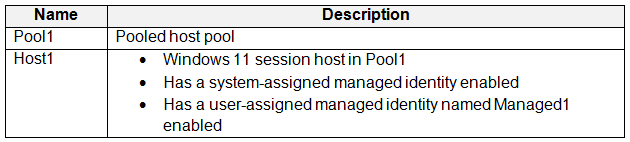
You have an Azure Virtual Desktop deployment that contains the resources shown in the following table. You plan to enable Start VM on connect for Pool1. You create a custom Azure role named Role1 that has sufficient permissions to start virtual machines on demand. You need to ensure that the session hosts in Pool1 can start on demand. To which service principal should you assign Role1?

Exhibit 1 for question 79
  • AManaged1
  • BAzure Virtual Desktop (correct answer)
  • CAzure Automation
  • DHost1
  • EAzure Compute
Reveal answer & explanation
Correct answer: B

The correct answer is B. Option B: Azure Virtual Desktop.

Topic 3 Β· Question 80

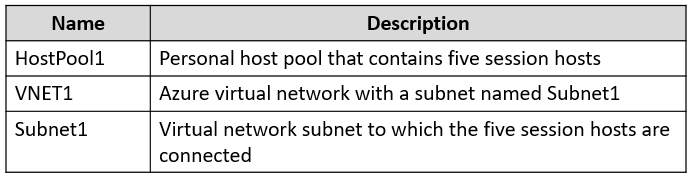
You have an Azure Virtual Desktop deployment that contains the resources shown in the following table. You need to enable just-in-time (JIT) VM access for all the session hosts. What should you do first?

Exhibit 1 for question 80
  • ADeploy Azure Bastion to VNET1.
  • BAssign network security groups (NSGs) to the network interfaces of the five session hosts.
  • CConfigure Access control (IAM) for HostPool1.
  • DAssign a network security group (NSG) to Subnet1. (correct answer)
Reveal answer & explanation
Correct answer: D

The correct answer is D. Option D: Assign a network security group (NSG) to Subnet1.

Explanation

A Network Security Group (NSG) filters inbound and outbound traffic to subnets and NICs with allow/deny rules. A Network Security Group (NSG) applies allow/deny rules to control traffic at the subnet or NIC level.

Topic 3 Β· Question 86

You have an Azure Virtual Desktop deployment that contains a host pool named Pool1. Pool1 contains two session hosts named Host1 and Host2. You need to enable screen capture protection for the deployment. What should you do?

  • AConfigure a Group Policy setting on Host1 and Host2. (correct answer)
  • BFrom RDP Properties for Pool1, disable Clipboard redirection.
  • CInstall an Azure virtual machine extension on Host1 and Host2.
  • DFrom RDP Properties for Pool1, disable encoding of redirected video.
Reveal answer & explanation
Correct answer: A

The correct answer is A. Option A: Configure a Group Policy setting on Host1 and Host2.

Topic 3 Β· Question 88

You have an on-premises Active Directory Domain Services (AD DS) domain named contoso.com that syncs with an Azure AD tenant. You have an Azure subscription that is linked to the Azure AD tenant. The subscription contains a user named User1 that has the following properties: β€’ User logon name: [email protected] β€’ SID: S-1-5-21-4534338-1127018997-2609994386-5108 β€’ User logon name (pre-Windows 2000): CONTOSO\User1 The subscription contains an Azure Virtual Desktop deployment. The deployment contains a domain-joined session host named Host1 and an Azure file share. You need to configure per-user FSLogix profile settings for Host1. How should you reference User1 in the FSLogix registry configuration?

  • A[email protected]
  • BCONTOSO\User1
  • CUser1
  • DS-1-5-21-4534338-1127018997-2609994386-5108 (correct answer)
Reveal answer & explanation
Correct answer: D

The correct answer is D. Option D: S-1-5-21-4534338-1127018997-2609994386-5108.

Topic 3 Β· Question 89

You have an Azure Virtual Desktop deployment. You plan to use just-in-time (JIT) VM access to manage session host virtual machines. You need to recommend license requirements for JIT VM access. Your solution must minimize costs. Which license should you recommend?

  • AEnterprise Mobility + Security E5
  • BMicrosoft 365 E5
  • CMicrosoft Defender for Servers Plan 1
  • DMicrosoft Defender for Servers Plan 2 (correct answer)
Reveal answer & explanation
Correct answer: D

The correct answer is D. Option D: Microsoft Defender for Servers Plan 2 This option delivers the requirement at the lowest cost.

Topic 3 Β· Question 91

Note: This question is part of a series of questions that present the same scenario. Each question in the series contains a unique solution that might meet the stated goals. Some question sets might have more than one correct solution, while others might not have a correct solution. After you answer a question in this section, you will NOT be able to return to it. As a result, these questions will not appear in the review screen. You have an Azure Virtual Desktop deployment. You need to ensure that users are signed out automatically when they disconnect from a session. Solution: From the Local Group Policy Editor, you configure the Security settings. Does this meet the goal?

  • AYes
  • BNo (correct answer)
Reveal answer & explanation
Correct answer: B

The correct answer is B. Option B: No.

Topic 3 Β· Question 92

Note: This question is part of a series of questions that present the same scenario. Each question in the series contains a unique solution that might meet the stated goals. Some question sets might have more than one correct solution, while others might not have a correct solution. After you answer a question in this section, you will NOT be able to return to it. As a result, these questions will not appear in the review screen. You have an Azure Virtual Desktop deployment. You need to ensure that users are signed out automatically when they disconnect from a session. Solution: From the Local Group Policy Editor, you configure the Remote Session Environment settings. Does this meet the goal?

  • AYes
  • BNo (correct answer)
Reveal answer & explanation
Correct answer: B

The correct answer is B. Option B: No.

Topic 3 Β· Question 93

Note: This question is part of a series of questions that present the same scenario. Each question in the series contains a unique solution that might meet the stated goals. Some question sets might have more than one correct solution, while others might not have a correct solution. After you answer a question in this section, you will NOT be able to return to it. As a result, these questions will not appear in the review screen. You have an Azure Virtual Desktop deployment. You need to ensure that users are signed out automatically when they disconnect from a session. Solution: From the Local Group Policy Editor, you configure the Session Time Limits settings. Does this meet the goal?

  • AYes (correct answer)
  • BNo
Reveal answer & explanation
Correct answer: A

The correct answer is A. Option A: Yes.

Topic 3 Β· Question 94

Note: This question is part of a series of questions that present the same scenario. Each question in the series contains a unique solution that might meet the stated goals. Some question sets might have more than one correct solution, while others might not have a correct solution. After you answer a question in this section, you will NOT be able to return to it. As a result, these questions will not appear in the review screen. You have an Azure Virtual Desktop deployment. You need to ensure that users are signed out automatically when they disconnect from a session. Solution: From the Local Group Policy Editor, you configure the Connections settings. Does this meet the goal?

  • AYes
  • BNo (correct answer)
Reveal answer & explanation
Correct answer: B

The correct answer is B. Option B: No.

Topic 3 Β· Question 96

You have a new Azure subscription that uses Azure Virtual Desktop. You need to ensure that users who connect to Azure Virtual Desktop sessions reauthenticate every six hours. What should you do first?

  • ACreate a Conditional Access policy.
  • BDisable Security defaults. (correct answer)
  • CConfigure an authentication methods policy.
  • DConfigure multi-factor authentication (MFA).
Reveal answer & explanation
Correct answer: B

The correct answer is B. Option B: Disable Security defaults.

Topic 3 Β· Question 98

You have an Azure Virtual Desktop deployment that contains a host pool named Pool1. You plan to create a Windows 10 image named Image1 to deploy new session hosts to Pool1. You need to ensure that all the new session hosts deployed by using Image1 are onboarded to Microsoft Defender for Endpoint. What should you do?

  • ARun a Defender for Endpoint onboarding script on Image1, and then run sysprep.
  • BAdd a Defender for Endpoint onboarding script to image1, and then run the script at first start. (correct answer)
  • CCreate an MSIX package for Pool1.
  • DCreate an automation task for Pool1.
Reveal answer & explanation
Correct answer: B

The correct answer is B. Option B: Add a Defender for Endpoint onboarding script to image1, and then run the script at first start.

Topic 3 Β· Question 102

Your on-premises network contains an Active Directory Domain Services (AD DS) domain named contoso.com. You have an Azure subscription that is linked to a Microsoft Entra tenant named contoso.onmicrosoft.com. Contoso.com syncs with contoso.onmicrosoft.com. You have a partner company that has a Microsoft Entra tenant named fabrikam.com. Contoso.onmicrosoft.com contains the resources shown in the following table. You deploy an Azure Virtual Desktop host pool named Pool1. Pool1 contains 10 session hosts that are joined to Contoso.com. You assign Group1 to the application group in Pool1. You need to identify which users will be able to sign in to the session hosts in Pool1. Which users should you identify?

Exhibit 1 for question 102
  • AUser1 only (correct answer)
  • BUser1 and User2 only
  • CUser1 and User3 only
  • DUser1, User2, and User3
Reveal answer & explanation
Correct answer: A

The correct answer is A. Option A: User1 only.

Topic 3 Β· Question 103

You have an Azure Virtual Desktop deployment that contains a host pool named Pool1. Pool1 contains 10 session hosts. You need to enable screen capture protection on all the session hosts in Pool1. The solution must minimize administrative effort. What should you do?

  • AFrom RDP Properties for Pool1, configure the Session behavior settings.
  • BOn each session host, configure a local Group Policy setting. (correct answer)
  • CTo each session host, add an extension.
  • DFrom RDP Properties for Pool1, configure the Display settings.
Reveal answer & explanation
Correct answer: B

The correct answer is B. Option B: On each session host, configure a local Group Policy setting.

Topic 3 Β· Question 104

You have an Azure Virtual Desktop deployment. You need to secure administrative access to session hosts. The solution must require that administrators use the Azure portal to access the session hosts. What should you include in the solution?

  • AAzure Firewall
  • BAzure Bastion (correct answer)
  • CConditional Access policies
  • DMicrosoft Defender for Cloud
Reveal answer & explanation
Correct answer: B

The correct answer is B. Option B: Azure Bastion

Explanation

Azure Bastion provides secure RDP/SSH access to VMs through the portal without exposing public IPs.

Topic 3 Β· Question 105

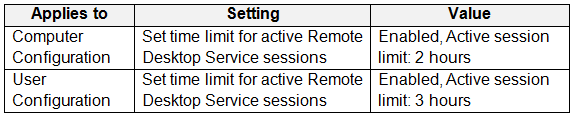
You have an Azure Virtual Desktop deployment that contains a host pool named Pool1. Pool1 contains session hosts that are joined to a Microsoft Entra Domain Services managed domain. The domain contains a user named User1. You configure AADDC Computers GPO as shown in the following table. You configure AADDC Users GPO as shown in the following table. How long after connecting to a session host will User1 be disconnected?

Exhibit 1 for question 105Exhibit 2 for question 105
  • A2 hours (correct answer)
  • B3 hours
  • C6 hours
  • D8 hours
Reveal answer & explanation
Correct answer: A

The correct answer is A. Option A: 2 hours.

Showing questions 41–60 of 218 Β· Page 3 of 11